
Mail that runs on your Mac.
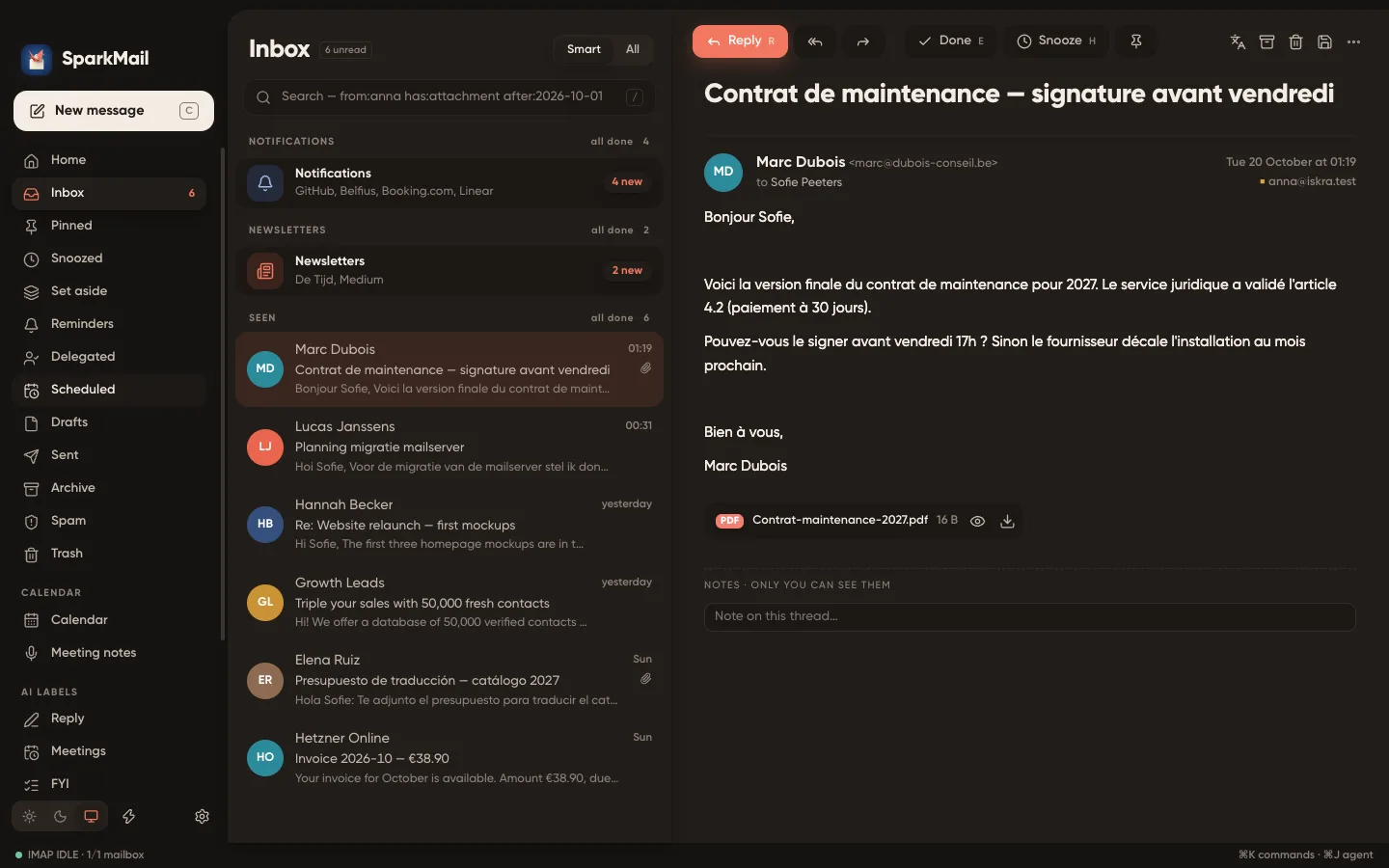
A personal mail client with a smart inbox, snooze, autopilot rules and an AI assistant on your own model. No subscription, no ads, no cloud in between.

No account to create. Macs with an Intel processor are not supported yet.
Sorted before you open it.
- Awaiting reply (6)
- People (3)
- Notifications (4)
- Newsletters (2)
- New senders — held (1)
People who wait for you come first. Notifications and newsletters collapse into one line each. Unknown senders wait at the door until you let them in.
Everything a mail client should do, on your terms.
-
Your own model
Summaries, smart drafts, translation, phishing checks and an agent that searches your mail — through Ollama, LM Studio, llama.cpp or any OpenAI-compatible server you run.
-
Rules in plain words
Write “archive GitHub notifications about closed issues” and the AI builds the rule. Every action lands in a log you can read.
-
Snooze, pin, set aside
Send a message back to later, keep the important ones pinned, set things aside without losing sight of them. Undo with Z.
-
Trackers stripped
Remote images blocked, tracking pixels cut out, no telemetry. The app talks only to your mail servers and your AI.
-
Meetings and notes
macOS Calendar next to your mail, invitations answered in one click, meetings recorded and transcribed on this Mac with whisper.cpp.
-
PGP built in
OpenPGP encryption and signatures, keys found by WKD, decrypted mail never written to disk. Passwords stay in the macOS keychain.
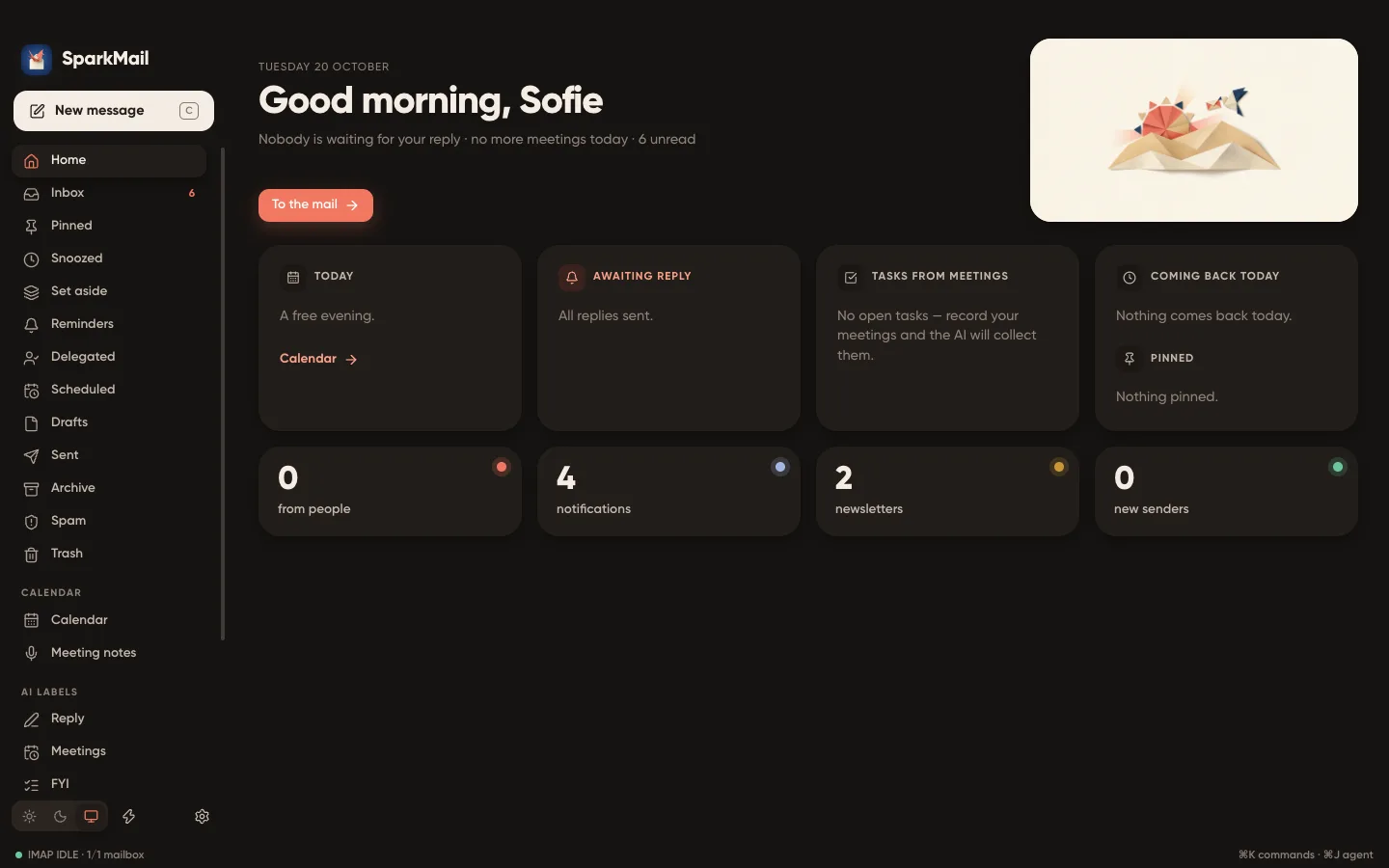
A start screen that says what matters.
Who is waiting for your answer, which meetings are left today, what comes back from snooze — before you dive into the inbox.
Three steps, two minutes.
Download and drag
Open the DMG and drag SparkMail to Applications.
Confirm the first launch
SparkMail is signed by IBCSC but not notarized by Apple. On first launch open System Settings → Privacy & Security and click “Open Anyway”.
Connect your mailbox
Any IMAP/SMTP account: Gmail and iCloud with an app password, Outlook, Fastmail or your own domain. AI is optional — point it to Ollama in Settings → AI.
SHA-256 of the DMG4afed0d5e4da68e8d00d30f97cce639ea8a53cc0b7bdce1e56081bb7c0383ece
Questions
Is it really free?
Yes. SparkMail is made by IBCSC, a Belgian non-profit for citizen cybersecurity. There is no subscription, no ads and no premium tier.
Where does my mail go?
Straight between your Mac and your mail server. Nothing passes through IBCSC or any third-party cloud; mail is cached in a local database on your Mac.
Do I need an AI model?
No. Everything works without AI. With a local model (Ollama, LM Studio, llama.cpp) you get summaries, drafts, translation and the mail agent — still without leaving your network.
Why does macOS warn me on first launch?
The app is signed with the IBCSC certificate but not notarized by Apple. Confirm once in System Settings → Privacy & Security → Open Anyway.
Which languages does it speak?
English, French, Dutch, German, Spanish and Russian. It follows macOS by default; change it in Settings → General.
Intel Macs, Windows, iPhone?
For now SparkMail runs on Macs with Apple Silicon (M1 and later), macOS 13 or newer.